APITOR
APITOR Robot X 12-in-1 Programmable Building Block Intelligent Robot SuperBot Robot Kit APR05 | 600 Pieces × 3 Motors × 3 Sensors | Scratch Graphical Programming, App Remote Control, STEM Educational Toy (Ages 8+)
APITOR Robot X 12-in-1 Programmable Building Block Intelligent Robot SuperBot Robot Kit APR05 | 600 Pieces × 3 Motors × 3 Sensors | Scratch Graphical Programming, App Remote Control, STEM Educational Toy (Ages 8+)
Couldn't load pickup availability
- 商品描述
- 送貨及付款方式


APITOR Robot X 12-in-1 Programmable Building Block Robot (APR05) — Build 12 different robots that can move, light up, and play music with a single kit. Learn STEM through hands-on building and programming. Genuine product with a one-year warranty.
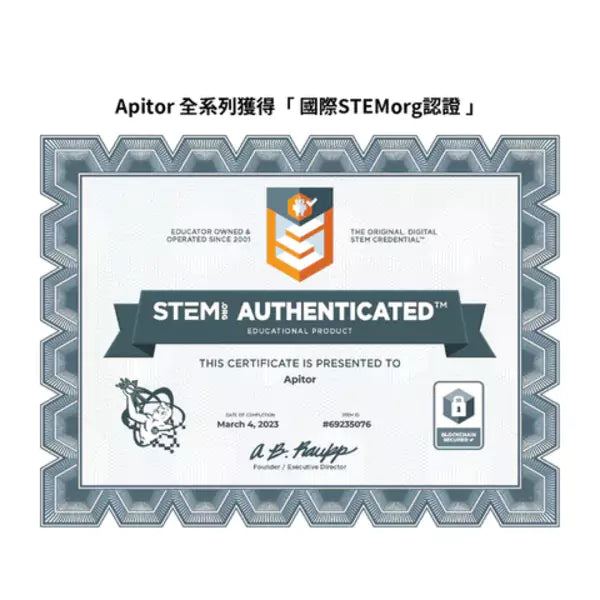
The APITOR Robot X (SuperBot Robot Kit APR05) is an advanced STEM educational robot kit designed for children aged 8 and up. It includes 600 high-quality ABS building blocks, one control module with 7-color LEDs, three motors (two high-speed motors in the high-speed module + one low-speed motor module), two infrared sensors, and one color sensor. It can be assembled into 12 pre-designed robots, including a dinosaur, car, helicopter, musical instruments, and more. With the free Apitor Kit App, children can remotely control the robots' movements or use the world’s most popular Scratch-based graphical programming interface to learn how to code robots to walk automatically, follow lines, avoid obstacles, control LED lights, and play music. It has passed multiple toy safety certifications in the US and Europe and is internationally certified by STEM.org, making it an ideal gift for boys and girls. *Requires 3 AA batteries (sold separately) and your own iOS/Android smartphone or tablet.
12-in-1 Robot | 600 Building Blocks | 3 Motors | 2 Infrared Sensors + 1 Color Sensor | 7-Color LED Control Module | Scratch-based Graphical Programming | App Bluetooth Remote Control | Multi-country Safety Certifications | STEM.org Certified | Genuine Product with One-Year Warranty
Are you facing these challenges?
- Your child is addicted to mobile games, and you want a toy that uses a phone but isn't just for gaming—a toy with genuine learning value.
- You want your child to explore programming, but professional courses are expensive, and you worry they won't sit still or grasp the concepts.
- You've bought block toys that were only played with once and then left gathering dust.
- You want to give an educational and fun birthday/Christmas gift but don't know where to start.
- You hope your child will engage less in passive entertainment and more in creative, hands-on activities that foster logical thinking and problem-solving skills.
Why choose a robot you can "build, move, and program"?
Standard building blocks only allow for construction, and standard remote-control cars only offer simple play. Robot X combines blocks, motors, sensors, and programming: children build the structure to understand how mechanical systems work, use the app to control the robot and feel the interplay of motors and gears, and finally use graphical programming to turn concepts like "conditions, loops, and sensor input" into real actions. From concrete to abstract, from play to learning, children grasp the core principles of STEM (Science, Technology, Engineering, Mathematics) effortlessly. Plus, with 12 models to build and rebuild, it keeps them entertained for a long time.
Three Key Features
1. 12-in-1 Advanced Robot Kit
With 600 blocks, 3 motors, and 3 sensors, you can build 12 pre-designed robots, including a dinosaur, car, helicopter, musical instrument, and drawing machine. Each model uses a different combination of motors and sensors, teaching new mechanical principles with every build. After completing the official models, children are free to use their imagination to create their own robots, offering endless playability.
2. Scratch-based Graphical Programming
Using the world's most popular graphical programming interface, children simply drag and drop block-style commands to program their robots to move, follow lines, detect and avoid obstacles, trigger 7-color LED effects, and play music. There is no need to memorize syntax. Starting from zero, kids progressively learn programming logic like conditional statements, loops, and sensor control.
3. Bluetooth App Remote Control
Download the free Apitor Kit App and connect via Bluetooth to your control module. You can remotely move your robot forward, backward, left, right, or even perform 360° stunts. Three powerful motors provide plenty of force, allowing for racing competitions with friends, turning learning into fun interactive moments for both parents and kids.
Thoughtful Design
- 7-Color LED Control Module: The main unit features built-in 7-color LEDs that can be programmed to change colors, making the robots more lively and engaging.
- Dual Infrared Sensors + Color Sensor: Detect obstacle distance, follow black lines, and identify colors like red and blue as trigger conditions, enriching the programming possibilities.
- High-Speed + Low-Speed Motor Modules: The high-speed module handles movement and steering, while the low-speed motor powers precision mechanisms like arms, heads, lifts, and catapults.
- In-App Illustrated Instructions: Step-by-step assembly guides allow children to complete builds independently. Includes a physical manual and a sorting tray for parts organization.
- High-Quality ABS Blocks: Durable materials with rounded edges, compatible with standard building blocks, allowing you to combine them with existing sets at home.
- Multi-country Safety Certifications: Passed US and European safety standards including FCC, CPC, CPSIA, ASTM F963-17, CPSC 16, Prop 65, CE, EN71, EN62115, EN IEC 62115, UKCA, WEEE, RoHS, and STEM.org international certification.
Product Specifications
| Item | Specification |
|---|---|
| Brand | APITOR |
| Product Name | Robot X 12-in-1 Programmable Building Block Robot (SuperBot Robot Kit) |
| Model | APR05 |
| Block Quantity | 600 pieces |
| Assembling Models | 12 pre-designed robots (dinosaur, car, helicopter, instrument, etc.) |
| Motors | 3 (2 in high-speed module + 1 in low-speed module) |
| Sensors | Infrared Sensor x2, Color Sensor x1 |
| Control Module | 1 unit, built-in 7-color LED |
| Connectivity | Bluetooth 2402–2480MHz |
| Application | Apitor Kit (Free, App Store / Google Play) |
| System Requirements | Android 5 or above / iOS 9 or above |
| Programming Method | Scratch-based Graphical Programming |
| Power | 3 x AA batteries (not included) |
| Material | High-quality ABS Plastic |
| Age Range | 8 years and up |
| Safety Certifications | FCC, CPC, CPSIA, ASTM F963-17, CPSC 16, Prop 65, CE, EN71, EN62115, EN IEC 62115, UKCA, WEEE, RoHS, STEM.org Certified |
| Warranty | Genuine product, one-year warranty |
Contents: 600 x Building Blocks, 1 x Control Module, 1 x High-speed Motor Module (2 motors built-in), 1 x Low-speed Motor Module, 2 x Infrared Sensors, 1 x Color Sensor, 3 x Connection Cables, Assembly Manual, User Guide, Parts Sorting Tray
How to Use
| Step | Action | Description |
|---|---|---|
| 1 | Install Batteries | Open the battery cover of the control module and insert 3 AA batteries according to the correct polarity. |
| 2 | Download App | Search for "Apitor Kit" in the App Store or Google Play to download. Grant the necessary permissions (Android requires Location Services enabled for Bluetooth support). |
| 3 | Select Model & Build | Choose a robot model from the App or manual, follow the illustrations to assemble, and connect the motors and sensors. |
| 4 | Power & Connect | Turn on the power (blue light will flash once per second). Connect in the App (do not connect directly from the phone's Bluetooth settings page). |
| 5 | Control or Program | Select Remote Mode to control the robot, or enter the programming interface to drag and drop commands for execution. |
| 6 | Storage | Turn off the power after use, place parts back in the tray, and remove batteries if not used for a long time. |
Tips for Use
- We recommend starting with simpler models (like the car) to familiarize yourself with module connections before tackling complex structures like dinosaurs or helicopters.
- Sort blocks by color and shape in the tray before building; this drastically reduces build time and frustration.
- For beginners, try running the built-in example programs first, then modify parameters to observe changes, which deepens your understanding.
- For line-following tasks, use black electrical tape on a light-colored surface. The color sensor works best in well-lit environments.
- Parents can set small tasks (e.g., "reach the end while avoiding three obstacles") to make learning goal-oriented.
- If the connection is unstable, please ensure the batteries are fully charged and attempt to reconnect within the App.
Usage Precautions
This product is an educational toy for children aged 8 and up.
Important Reminders
- Contains small parts. Not for children under 3 years old due to choking hazard.
- Adult supervision is recommended for children under 8.
- Batteries must be installed with correct polarity. Do not mix new and old batteries or different battery types.
- Do not short-circuit battery terminals, and do not attempt to charge non-rechargeable batteries.
- Remove batteries if not in use for an extended period to prevent leakage and damage to the control module.
Do Not
- Do not expose the control module, motors, or sensors to water or moisture.
- Do not attempt to disassemble electronic modules or cables.
- Do not operate the robot on high surfaces like stairs or table edges to avoid drops and damage.
- Do not force-connect electronic modules with non-original parts.
During Operation
- Do not manually obstruct the gears or wheels while the motor is running.
- If modules overheat, smell strange, or fail to power on, stop using immediately and contact customer service.
- Always connect using the Apitor Kit App; do not pair directly from the phone’s system Bluetooth settings.
Who is this for?
- Boys and girls aged 8-12 who enjoy building blocks.
- Children who want to learn programming from scratch without the boredom of sitting through static classes.
- Parents wanting to reduce their child's passive screen time and encourage creative, logical thinking.
- Kids who already own basic blocks and want to upgrade to "moving, programmable" advanced play.
- Teachers looking for teaching materials for schools, interest groups, or STEM classes.
- Parents and relatives seeking an educational birthday, Christmas, or academic achievement gift.
- Adults and LEGO fans who enjoy blocks and mechanics, perfect for parent-child bonding.
FAQ
Q1: What's the difference between Robot X and standard block robots?
A: Robot X is an advanced kit featuring 3 motors and 3 sensors (2 infrared + 1 color). Beyond App remote control, it supports Scratch-based graphical programming, allowing kids to code line-following, obstacle avoidance, lighting, and music—a 3-in-1 "Build + Play + Program" STEM toy.
Q2: Can a child play if they have zero programming experience?
A: Yes. Graphical programming uses drag-and-drop commands, requiring no typing or syntax knowledge. The App includes example programs to follow, allowing kids to learn progressively.
Q3: What devices are required?
A: You need your own iOS 9+ or Android 5+ smartphone/tablet to download the free Apitor Kit App via Bluetooth. 3 AA batteries are required (not included).
Q4: Can all 12 models be built at the same time?
A: No. The blocks, motors, and sensors are shared across models; one robot can be built at a time. Rebuilding encourages kids to learn mechanical structures, and they can eventually create their own original designs.
Q5: Is it compatible with other building block brands?
A: Yes, Robot X uses standard industry block dimensions, making them generally compatible with most common blocks for expanded creative possibilities.
Q6: How long does it take to build one model?
A: Depending on the complexity and experience, a simple model takes 1-2 hours, while complex ones may take several hours. We suggest completing it in stages. The App provides step-by-step illustrations.
Q7: Is the product safe?
A: Robot X is made from high-quality ABS plastic and holds numerous international safety certifications, including FCC, CPC, CPSIA, ASTM F963-17, CE, EN71, EN62115, UKCA, RoHS, and STEM.org certification. Contains small parts; keep away from children under 3.
Q8: How is the warranty handled?
A: This is a genuine product with a one-year warranty. If an electronic module fails due to non-human damage, keep your proof of purchase and contact customer support.
Build × Move × Program—APITOR Robot X 12-in-1 Programmable Building Block Robot, helping children take their first step into the world of STEM and coding.
為何選擇 PriseMall?
國際級 PCI-DSS 銀行支付加密
PriseMall 採用最高級別的國際支付加密技術。您的信用卡資料將直接傳送至銀行系統進行授權,過程絕不經由第三方公司,本公司亦無法獲取或儲存您的任何信用卡資訊,確保您的交易 100% 安全保密。

🏆 15 年採購及代理資歷
自 2012 年嚴選日韓泰好物,為您提供 100% 正品保障。

🏪 實體信心後盾
設有實體店及授權分銷點,看得見的真實營運讓您買得安心。

💬 專人一對一跟進
團隊專人真實幫助您解答疑問。
全球配送服務
PriseMall 致力為全球客戶提供安全、快捷的購物體驗
📦 國際快遞送門
支援英、美、澳、加等多國專線派送,全程物流追蹤,安全直達府上。
📍 智能櫃/網點自取
結帳時填寫順豐站或智能櫃編號及地址,即可享受 24 小時彈性取件。
🏪 實體店自取
歡迎網上預約下單,於營業時間內蒞臨 PriseMall 交收店取貨。
預計派送時效 (Estimated Delivery Time)
| 配送地區 / Region | 時效 / Duration |
|---|---|
| 香港、澳門 (HK & Macau) | 0-1 工作天 (Business days) |
| 台灣 (Taiwan) | 3-7 工作天 (Business days) |
| 英國、美國、澳洲、加拿大 (UK, US, AU, CA) | 7-14 工作天 (Business days) |
| 亞洲其他地區 (Other Asia Regions) | 7-14 工作天 (Business days) |
| 歐洲及其他國際地區 (Europe & Global) | 10-19 工作天 (Business days) |