APITOR
Kids' Mini After-school STEM Program | Apitor Robot Learn-to-Code Blocks | Apitor Robot Basic Robot Q, Advanced Robot S
Kids' Mini After-school STEM Program | Apitor Robot Learn-to-Code Blocks | Apitor Robot Basic Robot Q, Advanced Robot S
Couldn't load pickup availability
- 商品描述
- 送貨及付款方式

In the booming information age of AI, are you worried that your children will fall behind? Are you worried that your children will miss the starting line?
Apitor coding blocks let children learn while playing! A great value choice to accompany children's growth! Apitor will once again bring children's imaginations to life through STEAM learning, which emphasizes competence-based learning in line with the 108 curriculum!

Welcome to the Apitor coding block kingdom!
The STEAM learning Apitor coding blocks have transformed into super cute big-eyed robots this time!
Accompany children into the world of image-building programming!

This time, the Apitor coding blocks are available in the basic Green Q and advanced Blue S versions, with diverse play options covering animals, vehicles, amusement rides, engineering machinery, etc., to help children explore various fields of life!
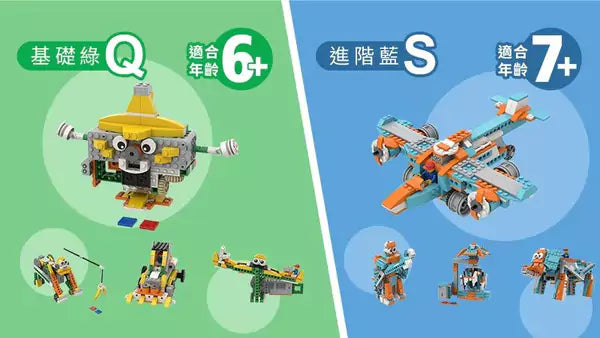
Basic Green Q
20-in-1 X Easy to get started X Diverse structures
The Green Q version is easy to get started with, allowing children to practice hand-eye coordination through assembling diverse structures!
Assembly time is approximately 0.5-1 hour, suitable for younger children!
20-in-1 play options, from a gorilla chasing bananas to a racing car, then transforming into a seesaw and a spinning top!

Advanced Blue S
10-in-1 X Advanced exploration X Artistic learning elements
The Blue S version offers advanced learning with more delicate block shapes and incorporates more STEAM (Art) learning elements in its design!
Assembly time is longer than Green Q, about 1-2 hours, suitable for children with prior block assembly experience. It can transform from an amusement park carousel to a boxing ring fighter! Then transform into a robot vacuum cleaner and an elephant!

Green QBlue S having trouble choosing? Look here!


STEAM focuses on interdisciplinary learning in Science, Technology, Engineering, Arts, and Mathematics, encouraging hands-on application beyond textbooks,
Through multi-sensory learning, it breaks the framework of knowledge being solely acquired through the brain, cultivating children's independent thinking and problem-solving skills!
Create future competitiveness!

Creativity XPlay XLearning
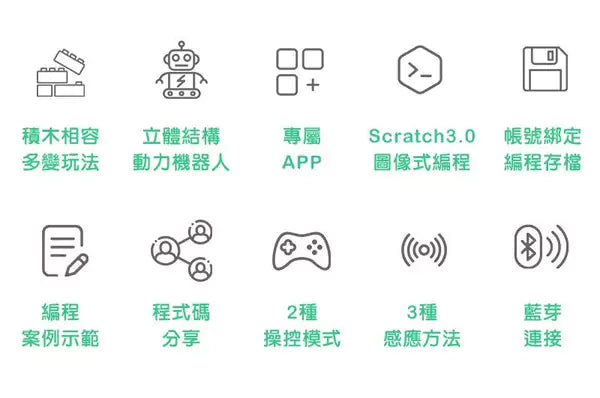
Play with blocks and learn to code! Rich gameplay satisfies children's creativity!
Learn in stages, starting from assembly, then combining power control and programming, step by step for in-depth learning!


Apitor coding blocks use mainstream Scratch 3.0 visual programming, with built-in introductory courses and programming examples in the APP for reference,
Easily and happily learn programming, taking the first step in programming learning!


Connecting the building blocks with the APP via Bluetooth allows for wireless remote control, and the APP's Bluetooth connection interface is more intuitive!
There's also a brand new motion-sensing gyroscope, voice control, distance obstacle detection, and RGB primary color recognition for diverse sensory experiences!
New motion-sensing gyroscope: the gyroscope in the phone/tablet APP controls motion, and the building blocks move after the receiving chip in the main controller detects it.
Voice control: detects sound via the phone's microphone.
Distance obstacle, RGB primary color recognition: detected by infrared sensor, color sensor.
The APP integrates multiple versions of the Apitor coding block series, allowing for easy switching with just a tap!
The APP can bind an account to save programming records in "My Works," allowing you to continue editing your work even on different devices. You can also easily share your programming,
By using the share button in the APP, you can scan a QR Code to share your program code with family and friends!


1. Click the block icon in the upper right corner of the main screen.
2. Select the block version you are using.

1.First, confirm if the currently selected block version is the one you are using. Please refer to the previous instructions.
2.Enter remote control from the main screen.
3.Click the Bluetooth icon in the upper right corner of the remote control screen.
4.Enter the Bluetooth connection screen (after installing batteries in the block main controller, turn on the power).
5.Click the robot ID that appears to complete the connection.

To switch between remote control and gyroscope motion control, click the gyroscope icon next to Bluetooth.
*Friendly reminder: If your device does not have a gyroscope sensor, this function cannot be used.

Apitor coding blocks combine three-dimensional structures with applied physical principles and dynamic mechanical operation, taking children on a journey through the ocean of physical knowledge!


Apitor coding blocks are compatible with mainstream building blocks, and can be combined with various Apitor coding block series to create more play possibilities.
Activate your existing building blocks and transform into a little inventor to create unique new designs!

1.Super cute big eyes, more adorable shapes, easier to get started
New: This series adds cute "eyes" to the robots, making them more vivid and engaging, and boosting learning motivation. The assembly difficulty has been adjusted for easier completion, making it suitable for even younger children.
Old: X generation blocks had a larger number of pieces, with average assembly times of 1.5-2 hours or more, and higher assembly difficulty.
2.Sensor and main controller combined
New: Simplifies complex assembly procedures and thickens connection lines to prevent breakage, making it easier for younger children to get started with assembly.
Old: Sensors and main controller were separate, and wires were separate from the main controller, leading to higher assembly difficulty but allowing for different applications.


*Note: Each box includes one user guide and one single-model assembly instruction manual.

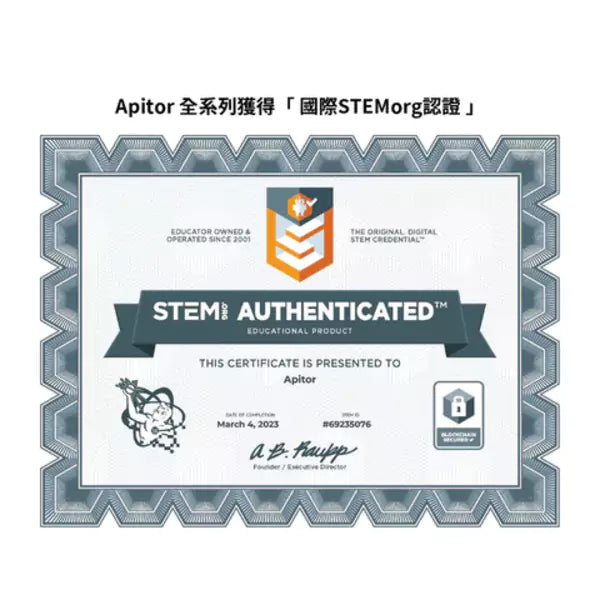
【International STEM.org Certification】

為何選擇 PriseMall?
國際級 PCI-DSS 銀行支付加密
PriseMall 採用最高級別的國際支付加密技術。您的信用卡資料將直接傳送至銀行系統進行授權,過程絕不經由第三方公司,本公司亦無法獲取或儲存您的任何信用卡資訊,確保您的交易 100% 安全保密。

🏆 15 年採購及代理資歷
自 2012 年嚴選日韓泰好物,為您提供 100% 正品保障。

🏪 實體信心後盾
設有實體店及授權分銷點,看得見的真實營運讓您買得安心。

💬 專人一對一跟進
團隊專人真實幫助您解答疑問。
全球配送服務
PriseMall 致力為全球客戶提供安全、快捷的購物體驗
📦 國際快遞送門
支援英、美、澳、加等多國專線派送,全程物流追蹤,安全直達府上。
📍 智能櫃/網點自取
結帳時填寫順豐站或智能櫃編號及地址,即可享受 24 小時彈性取件。
🏪 實體店自取
歡迎網上預約下單,於營業時間內蒞臨 PriseMall 交收店取貨。
預計派送時效 (Estimated Delivery Time)
| 配送地區 / Region | 時效 / Duration |
|---|---|
| 香港、澳門 (HK & Macau) | 0-1 工作天 (Business days) |
| 台灣 (Taiwan) | 3-7 工作天 (Business days) |
| 英國、美國、澳洲、加拿大 (UK, US, AU, CA) | 7-14 工作天 (Business days) |
| 亞洲其他地區 (Other Asia Regions) | 7-14 工作天 (Business days) |
| 歐洲及其他國際地區 (Europe & Global) | 10-19 工作天 (Business days) |